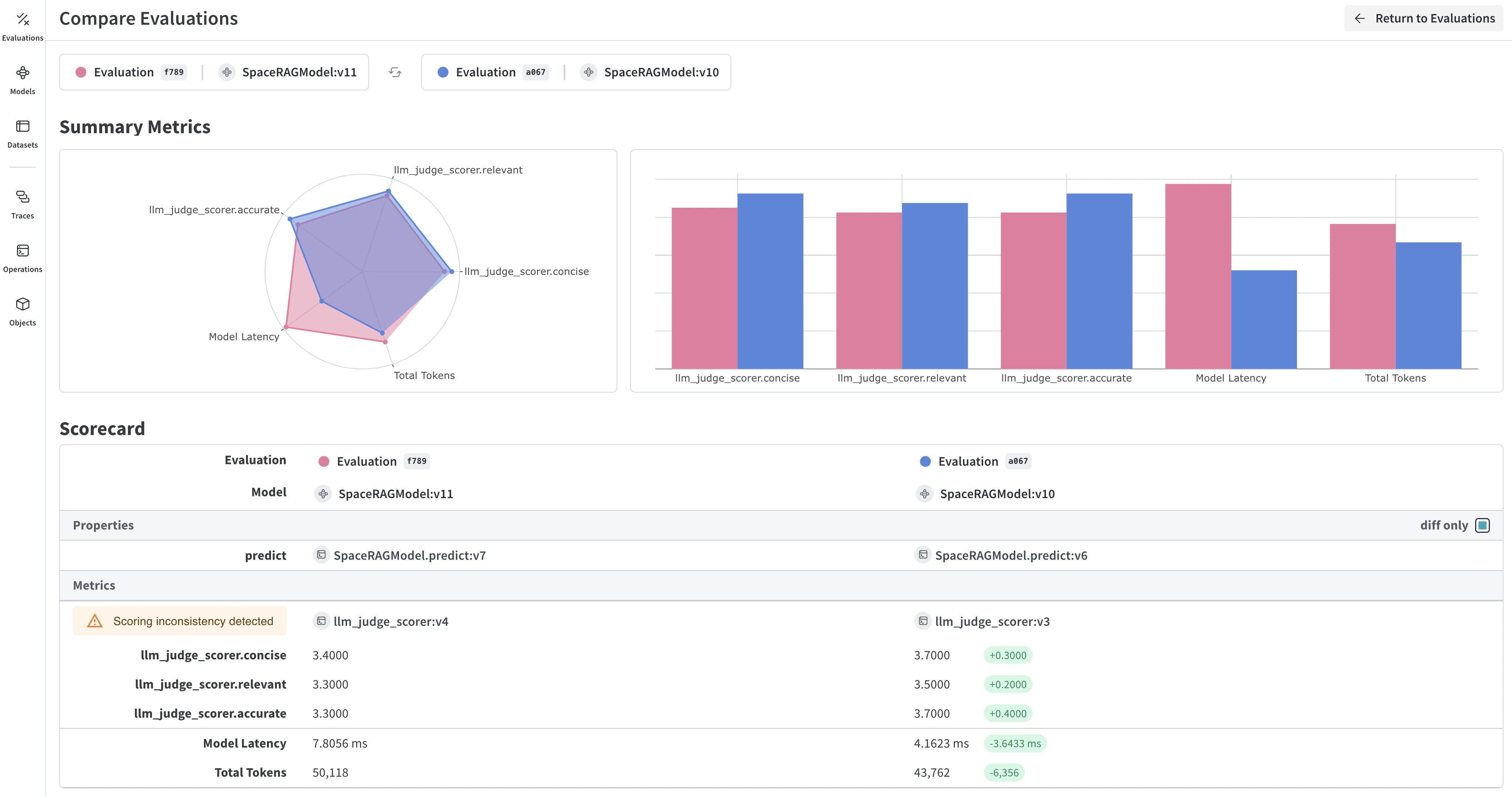
평가는 변경 사항을 적용한 후 예제 세트에 대해 애플리케이션을 테스트해, 애플리케이션을 반복적으로 개선하는 데 도움이 됩니다. Weave는 Model 및 평가 클래스를 통해 평가 추적을 기본적으로 지원합니다. API는 전제를 최소화하도록 설계되어 있어 다양한 사용 사례에 유연하게 대응할 수 있습니다.
Weave에서 Models는 객체이며, 모델/agent의 동작(로직, 프롬프트, 파라미터)과 버전 관리되는 메타데이터(파라미터, 코드, 마이크로 설정)를 함께 캡처하므로 안정적으로 추적, 비교, 평가하고 반복적으로 개선할 수 있습니다.Model을 인스턴스화하면 Weave가 해당 설정과 동작을 자동으로 캡처하고, 변경이 생기면 버전을 업데이트합니다. 따라서 반복적으로 개선하는 과정에서 시간 경과에 따른 성능을 추적할 수 있습니다.Model은 Model을 서브클래싱하고, 예제 하나를 받아 응답을 반환하는 predict 함수를 구현해 선언합니다.다음 예제 모델은 OpenAI를 사용해 입력된 문장에서 외계 과일의 이름, 색상, 맛을 추출합니다.
Python
TypeScript
class ExtractFruitsModel(weave.Model):
    model_name: str
    prompt_template: str

    @weave.op()
    async def predict(self, sentence: str) -> dict:
        client = openai.AsyncClient()

        response = await client.chat.completions.create(
            model=self.model_name,
            messages=[
                {"role": "user", "content": self.prompt_template.format(sentence=sentence)}
            ],
        )
        result = response.choices[0].message.content
        if result is None:
            raise ValueError("No response from model")
        parsed = json.loads(result)
        return parsed
// 참고: weave.Model은 아직 TypeScript에서 지원되지 않습니다.// 대신 모델처럼 동작하는 함수를 weave.op으로 감싸세요import * as weave from 'weave';import OpenAI from 'openai';const openaiClient = new OpenAI();const model = weave.op(async function myModel({datasetRow}) { const prompt = `Extract fields ("fruit": <str>, "color": <str>, "flavor") from the following text, as json: ${datasetRow.sentence}`; const response = await openaiClient.chat.completions.create({ model: 'gpt-3.5-turbo', messages: [{ role: 'user', content: prompt }], response_format: { type: 'json_object' } }); return JSON.parse(response.choices[0].message.content);});
ExtractFruitsModel 클래스는 Weave가 인스턴스화된 객체를 추적할 수 있도록 weave.Model을 상속합니다. @weave.op은 입력과 출력을 추적하기 위해 predict 함수에 적용하는 데코레이터입니다.Model 객체는 다음과 같이 인스턴스화할 수 있습니다.
Python
TypeScript
# 팀 이름과 프로젝트 이름을 설정하세요weave.init('<team-name>/eval_pipeline_quickstart')model = ExtractFruitsModel( model_name='gpt-3.5-turbo-1106', prompt_template='Extract fields ("fruit": <str>, "color": <str>, "flavor": <str>) from the following text, as json: {sentence}')sentence = "There are many fruits that were found on the recently discovered planet Goocrux. There are neoskizzles that grow there, which are purple and taste like candy."print(asyncio.run(model.predict(sentence)))# Jupyter Notebook 환경이라면 다음을 실행하세요:# await model.predict(sentence)
await weave.init('eval_pipeline_quickstart');const sentence = "There are many fruits that were found on the recently discovered planet Goocrux. There are neoskizzles that grow there, which are purple and taste like candy.";const result = await model({ datasetRow: { sentence } });console.log(result);
다음으로, 모델을 평가하는 데 사용할 데이터셋이 필요합니다. Dataset은 Weave 객체로 저장된 예제 모음입니다.다음 예제 데이터셋은 세 개의 입력 예제 문장과 해당 정답(labels)을 정의한 뒤, 스코어링 함수s가 읽을 수 있는 JSON 테이블 형식으로 구성합니다.이 예제에서는 코드에서 예제 목록을 만들지만, 실행 중인 애플리케이션에서 예제를 하나씩 로깅할 수도 있습니다.
Python
TypeScript
sentences = ["There are many fruits that were found on the recently discovered planet Goocrux. There are neoskizzles that grow there, which are purple and taste like candy.","Pounits are a bright green color and are more savory than sweet.","Finally, there are fruits called glowls, which have a very sour and bitter taste which is acidic and caustic, and a pale orange tinge to them."]labels = [ {'fruit': 'neoskizzles', 'color': 'purple', 'flavor': 'candy'}, {'fruit': 'pounits', 'color': 'bright green', 'flavor': 'savory'}, {'fruit': 'glowls', 'color': 'pale orange', 'flavor': 'sour and bitter'}]examples = [ {'id': '0', 'sentence': sentences[0], 'target': labels[0]}, {'id': '1', 'sentence': sentences[1], 'target': labels[1]}, {'id': '2', 'sentence': sentences[2], 'target': labels[2]}]
const sentences = [ "There are many fruits that were found on the recently discovered planet Goocrux. There are neoskizzles that grow there, which are purple and taste like candy.", "Pounits are a bright green color and are more savory than sweet.", "Finally, there are fruits called glowls, which have a very sour and bitter taste which is acidic and caustic, and a pale orange tinge to them."];const labels = [ { fruit: 'neoskizzles', color: 'purple', flavor: 'candy' }, { fruit: 'pounits', color: 'bright green', flavor: 'savory' }, { fruit: 'glowls', color: 'pale orange', flavor: 'sour and bitter' }];const examples = sentences.map((sentence, i) => ({ id: i.toString(), sentence, target: labels[i]}));
Weave evaluation을 사용할 때 Weave는 output과 비교할 target이 있어야 합니다. 다음 스코어링 함수는 두 개의 딕셔너리(target 및 output)를 받아, output이 target과 일치하는지를 나타내는 불리언 값 딕셔너리를 반환합니다. @weave.op() 데코레이터를 사용하면 Weave가 스코어링 함수의 실행을 추적할 수 있습니다.
import * as weave from 'weave';const fruitNameScorer = weave.op( function fruitNameScore({target, output}) { return { correct: target.fruit === output.fruit }; });
직접 스코어링 함수를 만들려면 Scorers 가이드를 참조하세요.일부 애플리케이션에서는 맞춤형 Scorer 클래스를 만들고 싶을 수 있습니다. 예를 들어, 특정 매개변수(예: 채팅 모델 또는 프롬프트), 특정 행 스코어링, 집계 점수 계산을 포함하는 표준화된 LLMJudge 클래스를 만들 수 있습니다. 자세한 내용은 다음 장의 RAG 애플리케이션의 모델 기반 평가에서 Scorer 클래스를 정의하는 튜토리얼을 참조하세요.
맞춤형 스코어링 함수과 함께 Weave의 내장 스코어러도 사용할 수 있습니다. 다음 평가에서 weave.Evaluation()은 이전 섹션에서 정의한 fruit_name_score 함수와 F1 점수를 계산하는 내장 MultiTaskBinaryClassificationF1 스코어러를 사용합니다.다음 예제에서는 두 함수로 점수를 계산해 fruits 데이터셋에서 ExtractFruitsModel을 평가하고, 결과를 Weave에 기록합니다.
Python
TypeScript
weave.init('eval_pipeline_quickstart')evaluation = weave.Evaluation( name='fruit_eval', dataset=dataset, scorers=[ MultiTaskBinaryClassificationF1(class_names=["fruit", "color", "flavor"]), fruit_name_score ],)print(asyncio.run(evaluation.evaluate(model)))# Jupyter Notebook에서 실행 중이면 다음을 실행하세요:# await evaluation.evaluate(model)
import * as weave from 'weave';await weave.init('eval_pipeline_quickstart');const evaluation = new weave.Evaluation({ name: 'fruit_eval', dataset: dataset, scorers: [fruitNameScorer],});const results = await evaluation.evaluate(model);console.log(results);
Python 스크립트에서 실행하는 경우 asyncio.run을 사용해야 합니다. 하지만 Jupyter Notebook에서 실행하는 경우에는 await를 직접 사용할 수 있습니다.
import jsonimport asyncioimport openaiimport weavefrom weave.scorers import MultiTaskBinaryClassificationF1# Weave 초기화 (한 번만)weave.init('eval_pipeline_quickstart')# 1. 모델 정의class ExtractFruitsModel(weave.Model): model_name: str prompt_template: str @weave.op() async def predict(self, sentence: str) -> dict: client = openai.AsyncClient() response = await client.chat.completions.create( model=self.model_name, messages=[{"role": "user", "content": self.prompt_template.format(sentence=sentence)}], ) result = response.choices[0].message.content if result is None: raise ValueError("No response from model") return json.loads(result)# 2. 모델 인스턴스화model = ExtractFruitsModel( model_name='gpt-3.5-turbo-1106', prompt_template='Extract fields ("fruit": <str>, "color": <str>, "flavor": <str>) from the following text, as json: {sentence}')# 3. 데이터셋 생성sentences = ["There are many fruits that were found on the recently discovered planet Goocrux. There are neoskizzles that grow there, which are purple and taste like candy.","Pounits are a bright green color and are more savory than sweet.","Finally, there are fruits called glowls, which have a very sour and bitter taste which is acidic and caustic, and a pale orange tinge to them."]labels = [ {'fruit': 'neoskizzles', 'color': 'purple', 'flavor': 'candy'}, {'fruit': 'pounits', 'color': 'bright green', 'flavor': 'savory'}, {'fruit': 'glowls', 'color': 'pale orange', 'flavor': 'sour and bitter'}]examples = [ {'id': '0', 'sentence': sentences[0], 'target': labels[0]}, {'id': '1', 'sentence': sentences[1], 'target': labels[1]}, {'id': '2', 'sentence': sentences[2], 'target': labels[2]}]dataset = weave.Dataset(name='fruits', rows=examples)weave.publish(dataset)# 4. 채점 함수 정의@weave.op()def fruit_name_score(target: dict, output: dict) -> dict: return {'correct': target['fruit'] == output['fruit']}# 5. 평가 실행evaluation = weave.Evaluation( name='fruit_eval', dataset=dataset, scorers=[ MultiTaskBinaryClassificationF1(class_names=["fruit", "color", "flavor"]), fruit_name_score ],)print(asyncio.run(evaluation.evaluate(model)))
import * as weave from 'weave';import OpenAI from 'openai';// Weave 초기화await weave.init('eval_pipeline_quickstart');// 1. 모델 정의// 참고: weave.Model은 아직 TypeScript에서 지원되지 않습니다.// 대신, 모델과 유사한 함수를 weave.op로 래핑하세요.const openaiClient = new OpenAI();const model = weave.op(async function myModel({datasetRow}) { const prompt = `Extract fields ("fruit": <str>, "color": <str>, "flavor": <str>) from the following text, as json: ${datasetRow.sentence}`; const response = await openaiClient.chat.completions.create({ model: 'gpt-3.5-turbo', messages: [{ role: 'user', content: prompt }], response_format: { type: 'json_object' } }); return JSON.parse(response.choices[0].message.content);});// 2. 데이터셋 생성const sentences = [ "There are many fruits that were found on the recently discovered planet Goocrux. There are neoskizzles that grow there, which are purple and taste like candy.", "Pounits are a bright green color and are more savory than sweet.", "Finally, there are fruits called glowls, which have a very sour and bitter taste which is acidic and caustic, and a pale orange tinge to them."];const labels = [ { fruit: 'neoskizzles', color: 'purple', flavor: 'candy' }, { fruit: 'pounits', color: 'bright green', flavor: 'savory' }, { fruit: 'glowls', color: 'pale orange', flavor: 'sour and bitter' }];const examples = sentences.map((sentence, i) => ({ id: i.toString(), sentence, target: labels[i]}));const dataset = new weave.Dataset({ name: 'fruits', rows: examples});await dataset.save();// 3. 채점 함수 정의const fruitNameScorer = weave.op( function fruitNameScore({target, output}) { return { correct: target.fruit === output.fruit }; });// 4. 평가 실행const evaluation = new weave.Evaluation({ name: 'fruit_eval', dataset: dataset, scorers: [fruitNameScorer],});const results = await evaluation.evaluate(model);console.log(results);