메인 콘텐츠로 건너뛰기
이 노트북은 대화형 노트북입니다. 로컬에서 실행하거나 아래 링크를 사용할 수 있습니다:

사전 요구 사항

시작하기 전에 필요한 라이브러리를 설치 및 임포트하고, W&B API 키를 준비한 뒤 Weave 프로젝트를 초기화하세요.
# 의존성 설치
!pip install openai weave -q
python
import json
import os

from google.colab import userdata
from openai import OpenAI

import weave
python
# API 키 조회
os.environ["OPENAI_API_KEY"] = userdata.get(
    "OPENAI_API_KEY"
)  # 왼쪽 메뉴에서 Colab 환경 시크릿으로 키를 설정하세요
os.environ["WANDB_API_KEY"] = userdata.get("WANDB_API_KEY")

# 프로젝트 이름 설정
# PROJECT 값을 프로젝트 이름으로 변경하세요
PROJECT = "vlm-handwritten-ner"

# Weave 프로젝트 초기화
weave.init(PROJECT)

1. Weave로 프롬프트 만들고 반복적으로 개선하기

좋은 프롬프트 엔지니어링은 모델이 엔터티를 정확하게 추출하도록 유도하는 데 매우 중요합니다. 먼저 이미지 데이터에서 무엇을 추출할지, 그리고 어떤 형식으로 출력할지에 대한 지침을 모델에 제공하는 기본 프롬프트를 만듭니다. 그런 다음 추적하고 반복적으로 개선할 수 있도록 이 프롬프트를 Weave에 저장합니다.
# Weave로 프롬프트 객체 생성
prompt = """
Extract all readable text from this image. Format the extracted entities as a valid JSON.
Do not return any extra text, just the JSON. Do not include ```json```
Use the following format:
{"Patient Name": "James James","Date": "4/22/2025","Patient ID": "ZZZZZZZ123","Group Number": "3452542525"}
"""
system_prompt = weave.StringPrompt(prompt)
# Weave에 프롬프트 게시
weave.publish(system_prompt, name="NER-prompt")
다음으로, 출력 오류를 줄일 수 있도록 프롬프트에 더 많은 지침과 검증 규칙을 추가해 개선합니다.
better_prompt = """
You are a precision OCR assistant. Given an image of patient information, extract exactly these fields into a single JSON object—and nothing else:

- Patient Name
- Date (MM/DD/YYYY)
- Patient ID
- Group Number

Validation rules:
1. Date must match MM/DD/YY; if not, set Date to "".
2. Patient ID must be alphanumeric; if unreadable, set to "".
3. Always zero-pad months and days (e.g. "04/07/25").
4. Omit any markup, commentary, or code fences.
5. Return strictly valid JSON with only those four keys.

Do not return any extra text, just the JSON. Do not include ```json```
Example output:
{"Patient Name":"James James","Date":"04/22/25","Patient ID":"ZZZZZZZ123","Group Number":"3452542525"}
"""
# 프롬프트 수정
system_prompt = weave.StringPrompt(better_prompt)
# 수정된 프롬프트를 Weave에 게시
weave.publish(system_prompt, name="NER-prompt")

2. 데이터셋 조회

다음으로, OCR 파이프라인의 입력으로 사용할 손글씨 메모 데이터셋을 조회합니다. 데이터셋의 이미지는 이미 base64로 인코딩되어 있으므로, LLM이 별도의 전처리 없이 바로 사용할 수 있습니다.
# 다음 Weave 프로젝트에서 데이터셋을 조회합니다
dataset = weave.ref(
    "weave://wandb-smle/vlm-handwritten-ner/object/NER-eval-dataset:G8MEkqWBtvIxPYAY23sXLvqp8JKZ37Cj0PgcG19dGjw"
).get()

# 데이터셋에서 특정 예시를 가져옵니다
example_image = dataset.rows[3]["image_base64"]

# example_image를 표시합니다
from IPython.display import HTML, display

html = f'<img src="{example_image}" style="max-width: 100%; height: auto;">'
display(HTML(html))

3. NER 파이프라인 구축

다음으로, NER 파이프라인을 구축합니다. 이 파이프라인은 두 개의 함수로 구성됩니다.
  1. 데이터셋의 PIL 이미지를 받아 VLM에 전달할 수 있도록 이미지의 base64 인코딩 문자열 표현을 반환하는 encode_image 함수
  2. 이미지와 시스템 프롬프트를 받아, 시스템 프롬프트에 설명된 대로 해당 이미지에서 추출한 개체명을 반환하는 extract_named_entities_from_image 함수
# GPT-4-Vision을 사용하는 추적 가능한 함수
def extract_named_entities_from_image(image_base64) -> dict:
    # LLM 클라이언트 초기화
    client = OpenAI()

    # 지시 프롬프트 설정
    # Weave에 저장된 프롬프트를 사용할 수도 있습니다: weave.ref("weave://wandb-smle/vlm-handwritten-ner/object/NER-prompt:FmCv4xS3RFU21wmNHsIYUFal3cxjtAkegz2ylM25iB8").get().content.strip()
    prompt = better_prompt

    response = client.responses.create(
        model="gpt-4.1",
        input=[
            {
                "role": "user",
                "content": [
                    {"type": "input_text", "text": prompt},
                    {
                        "type": "input_image",
                        "image_url": image_base64,
                    },
                ],
            }
        ],
    )

    return response.output_text
이제 다음을 수행하는 named_entity_recognation 함수를 만드세요.
  • 이미지 데이터를 NER 파이프라인에 전달합니다
  • 결과를 올바른 JSON 형식으로 반환합니다
함수 실행을 W&B UI에서 자동으로 추적하고 트레이스하려면 @weave.op() decorator 데코레이터를 사용하세요. named_entity_recognation이 실행될 때마다 전체 트레이스 결과를 Weave UI에서 확인할 수 있습니다. 트레이스를 보려면 Weave 프로젝트의 트레이스 탭으로 이동하세요.
# evaluations를 위한 NER 함수
@weave.op()
def named_entity_recognation(image_base64, id):
    result = {}
    try:
        # 1) vision op 호출 후 JSON 문자열 반환
        output_text = extract_named_entities_from_image(image_base64)

        # 2) JSON을 정확히 한 번만 파싱
        result = json.loads(output_text)

        print(f"Processed: {str(id)}")
    except Exception as e:
        print(f"Failed to process {str(id)}: {e}")
    return result
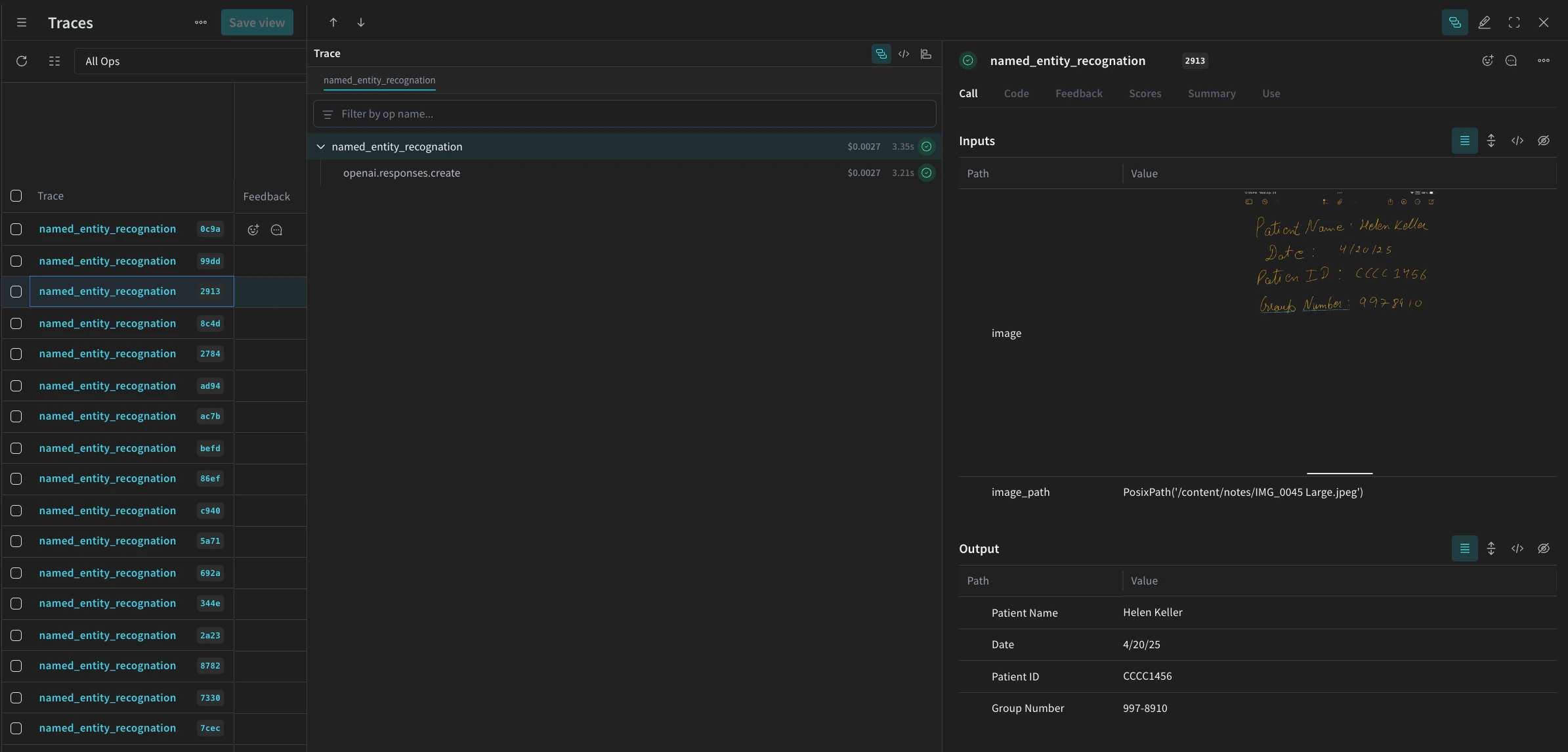
마지막으로, 데이터셋에 파이프라인을 실행하고 결과를 확인합니다. 다음 코드는 데이터셋을 순회하면서 결과를 로컬 파일 processing_results.json에 저장합니다. 결과는 Weave UI에서도 확인할 수 있습니다.
# 출력 결과
results = []

# 데이터셋의 모든 이미지를 순회
for row in dataset.rows:
    result = named_entity_recognation(row["image_base64"], str(row["id"]))
    result["image_id"] = str(row["id"])
    results.append(result)

# 모든 결과를 JSON 파일로 저장
output_file = "processing_results.json"
with open(output_file, "w") as f:
    json.dump(results, f, indent=2)

print(f"Results saved to: {output_file}")
Weave UI의 트레이스 테이블에서 아래와 비슷한 내용을 확인할 수 있습니다.
Screenshot 2025-05-02 at 12.03.00 PM.png

4. Weave를 사용해 파이프라인 평가하기

이제 VLM을 사용해 NER를 수행하는 파이프라인을 만들었으므로, Weave를 사용해 이를 체계적으로 평가하고 성능이 얼마나 잘 나오는지 확인할 수 있습니다. Evaluations Overview에서 Weave의 Evaluations에 관해 자세히 알아볼 수 있습니다. Weave 평가의 기본 구성 요소 중 하나는 Scorers입니다. Scorers는 AI의 출력 결과를 평가하고 평가 메트릭을 반환하는 데 사용됩니다. AI의 출력 결과를 받아 이를 분석한 뒤, 결과를 딕셔너리 형태로 반환합니다. 필요하면 입력 데이터를 기준 참조로 사용할 수 있으며, 평가에 대한 설명이나 추론 같은 추가 정보도 함께 출력할 수 있습니다. 이 섹션에서는 파이프라인을 평가하기 위해 두 개의 Scorer를 만듭니다:
  1. 프로그래매틱 Scorer
  2. LLM-as-a-judge Scorer

프로그래매틱 scorer

프로그래매틱 scorer인 check_for_missing_fields_programatically는 모델 출력(named_entity_recognition 함수의 출력)을 받아 결과에서 누락되었거나 비어 있는 keys를 파악합니다. 이 검사는 모델이 어떤 필드도 추출하지 못한 샘플을 파악하는 데 매우 유용합니다.
# scorer 실행을 추적하기 위해 weave.op()를 추가합니다
@weave.op()
def check_for_missing_fields_programatically(model_output):
    # 모든 항목에 필요한 키
    required_fields = {"Patient Name", "Date", "Patient ID", "Group Number"}

    for key in required_fields:
        if (
            key not in model_output
            or model_output[key] is None
            or str(model_output[key]).strip() == ""
        ):
            return False  # 이 항목에 누락되거나 비어 있는 필드가 있습니다

    return True  # 모든 필수 필드가 존재하며 비어 있지 않습니다

LLM-as-a-judge scorer

평가의 다음 step에서는 평가가 실제 NER 성능을 반영하도록 이미지 데이터와 모델 출력이 모두 제공됩니다. 모델 출력만 참조하는 것이 아니라 이미지 콘텐츠도 명시적으로 참조합니다. 이 step에 사용되는 scorer인 check_for_missing_fields_with_llm은 LLM(구체적으로는 OpenAI의 gpt-4o)을 사용해 점수를 매깁니다. eval_prompt의 내용에 지정된 대로 check_for_missing_fields_with_llmBoolean 값을 출력합니다. 모든 필드가 이미지의 정보와 일치하고 형식도 올바르면 scorer는 true를 반환합니다. 필드가 하나라도 누락되거나 비어 있거나 올바르지 않거나 서로 일치하지 않으면 결과는 false이며, scorer는 문제를 설명하는 메시지도 함께 반환합니다.
# LLM-as-a-judge의 시스템 프롬프트

eval_prompt = """
You are an OCR validation system. Your role is to assess whether the structured text extracted from an image accurately reflects the information in that image.
Only validate the structured text and use the image as your source of truth.

Expected input text format:
{"Patient Name": "First Last", "Date": "04/23/25", "Patient ID": "131313JJH", "Group Number": "35453453"}

Evaluation criteria:
- All four fields must be present.
- No field should be empty or contain placeholder/malformed values.
- The "Date" should be in MM/DD/YY format (e.g., "04/07/25") (zero padding the date is allowed)

Scoring:
- Return: {"Correct": true, "Reason": ""} if **all fields** match the information in the image and formatting is correct.
- Return: {"Correct": false, "Reason": "EXPLANATION"} if **any** field is missing, empty, incorrect, or mismatched.

Output requirements:
- Respond with a valid JSON object only.
- "Correct" must be a JSON boolean: true or false (not a string or number).
- "Reason" must be a short, specific string indicating all the problem — e.g., "Patient Name mismatch", "Date not zero-padded", or "Missing Group Number".
- Do not return any additional explanation or formatting.

Your response must be exactly one of the following:
{"Correct": true, "Reason": null}
OR
{"Correct": false, "Reason": "EXPLANATION_HERE"}
"""

# Scorer 실행을 추적하기 위해 weave.op() 추가
@weave.op()
def check_for_missing_fields_with_llm(model_output, image_base64):
    client = OpenAI()
    response = client.chat.completions.create(
        model="gpt-4o",
        messages=[
            {"role": "developer", "content": [{"text": eval_prompt, "type": "text"}]},
            {
                "role": "user",
                "content": [
                    {
                        "type": "image_url",
                        "image_url": {
                            "url": image_base64,
                        },
                    },
                    {"type": "text", "text": str(model_output)},
                ],
            },
        ],
        response_format={"type": "json_object"},
    )
    response = json.loads(response.choices[0].message.content)
    return response

5. 평가 실행

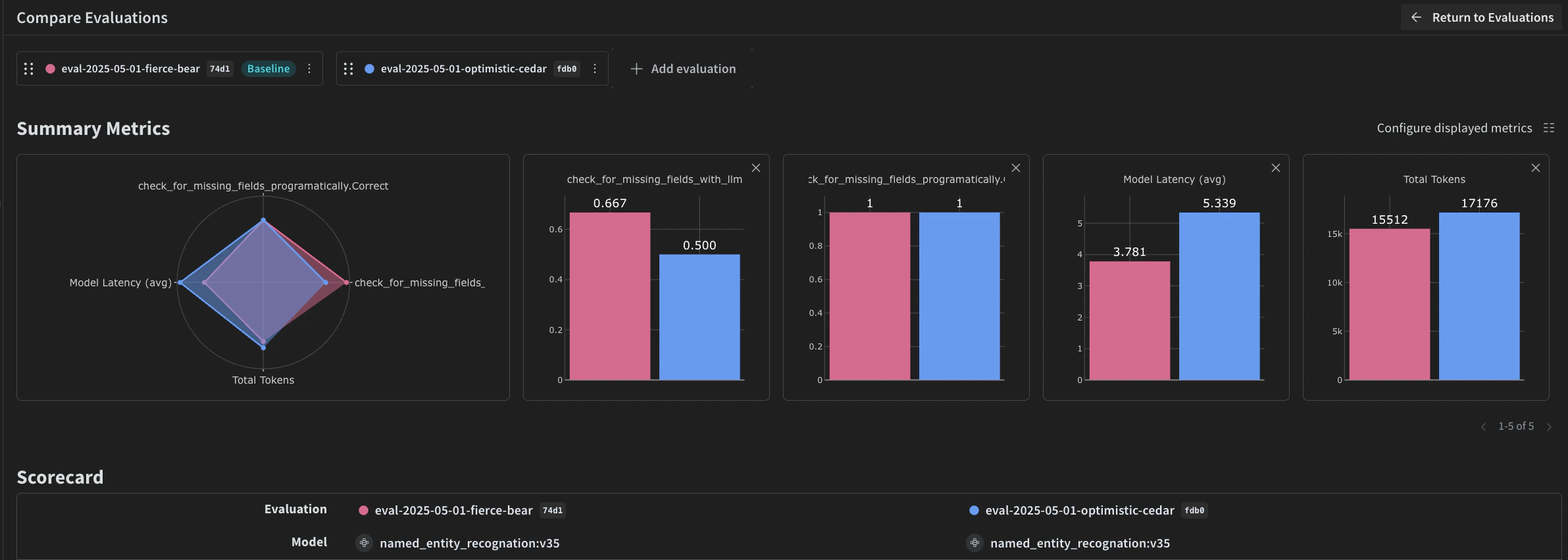
마지막으로, 전달된 dataset을 자동으로 순회하며 결과를 Weave UI에 함께 기록하는 평가 call을 정의합니다. 다음 코드는 평가를 시작하고 NER 파이프라인의 모든 출력에 두 개의 Scorer를 적용합니다. 결과는 Weave UI의 Evals 탭에서 확인할 수 있습니다.
evaluation = weave.Evaluation(
    dataset=dataset,
    scorers=[
        check_for_missing_fields_with_llm,
        check_for_missing_fields_programatically,
    ],
    name="Evaluate_4.1_NER",
)

print(await evaluation.evaluate(named_entity_recognation))
위 코드를 실행하면 Weave UI의 평가 테이블로 연결되는 링크가 생성됩니다. 이 링크를 따라가 결과를 확인하고, 원하는 모델, 프롬프트, Datasets 전반에 걸쳐 파이프라인의 여러 반복을 비교하세요. Weave UI는 팀을 위해 아래와 같은 시각화를 자동으로 생성합니다.
Screenshot 2025-05-02 at 12.26.15 PM.png