코드에 Weave를 통합하면 Python과 TypeScript에서 Anthropic SDK를 통해 이루어지는 LLM calls를 자동으로 추적하고 로깅합니다. Weave는 Anthropic의
 Messages.create()를 자동으로 호출해 이를 수행합니다.
코드에 weave.init("your-team-name/your-project-name")를 추가하면 Weave가 Anthropic SDK의 트레이스를 자동으로 캡처합니다. weave.init()에서 팀 이름을 인수로 지정하지 않으면 Weave는 출력을 기본 W&B entity에 기록합니다. 프로젝트 이름을 지정하지 않으면 Weave를 초기화할 수 없습니다.
다음 예제는 Anthropic에 대한 기본적인 call에 Weave를 통합하는 방법을 보여줍니다.
import weave
# 평소처럼 anthropic 라이브러리를 사용합니다
import os
from anthropic import Anthropic

weave.init("anthropic_project")

client = Anthropic(
api_key=os.environ.get("ANTHROPIC_API_KEY"),
)

message = client.messages.create(
max_tokens=1024,
messages=[
{
"role": "user",
"content": "Tell me a joke about a dog",
}
],
model="claude-3-opus-20240229",
)
print(message.content)
import Anthropic from '@anthropic-ai/sdk';
import * as weave from 'weave';
import { wrapAnthropic } from 'weave';

await weave.init('anthropic_project');

// 트레이싱을 활성화하려면 Anthropic 클라이언트를 래핑합니다
const client = wrapAnthropic(new Anthropic());

const message = await client.messages.create({
    max_tokens: 1024,
    messages: [
        {
            role: 'user',
            content: 'Tell me a joke about a dog',
        }
    ],
    model: 'claude-3-opus-20240229',
});

console.log(message.content);
weave.init()를 포함하면 Weave가 트레이싱 정보를 자동으로 캡처하고 링크를 출력합니다. 링크를 클릭하면 Weave UI에서 트레이스를 확인할 수 있습니다.
 Weave ops는 실험하면서 코드를 자동으로 버전 관리하고 입력과 출력을 캡처합니다. Python에서는
 @weave.op() 데코레이터를 사용하고, TypeScript에서는 weave.op()으로 래핑해 Anthropic.messages.create()를 호출하면 Weave가 입력과 출력을 대신 추적합니다.
다음 예제에서는 함수를 추적하는 방법을 보여줍니다.
import weave
import os
from anthropic import Anthropic

weave.init("anthropic_project")
client = Anthropic(
api_key=os.environ.get("ANTHROPIC_API_KEY"),
)

@weave.op()
def call_anthropic(user_input:str, model:str) -> str:
message = client.messages.create(
max_tokens=1024,
messages=[
{
"role": "user",
"content": user_input,
}
],
model=model,
)
return message.content[0].text

@weave.op()
def generate_joke(topic: str) -> str:
return call_anthropic(f"Tell me a joke about {topic}", model="claude-3-haiku-20240307")

print(generate_joke("chickens"))
print(generate_joke("cars"))
import Anthropic from '@anthropic-ai/sdk';
import * as weave from 'weave';
import { wrapAnthropic } from 'weave';

await weave.init('anthropic_project');
const client = wrapAnthropic(new Anthropic());

const callAnthropic = weave.op(async function callAnthropic(
    userInput: string,
    model: string
): Promise<string> {
    const message = await client.messages.create({
        max_tokens: 1024,
        messages: [
            {
                role: 'user',
                content: userInput,
            }
        ],
        model: model,
    });
    const content = message.content[0];
    return content.type === 'text' ? content.text : '';
});

const generateJoke = weave.op(async function generateJoke(
    topic: string
): Promise<string> {
    return callAnthropic(`Tell me a joke about ${topic}`, 'claude-3-haiku-20240307');
});

console.log(await generateJoke('chickens'));
console.log(await generateJoke('cars'));
weave.op()을 데코레이터로 적용하거나 래핑하면 Weave가 함수의 코드, 입력, 출력을 캡처합니다. 중첩 함수 등을 포함해 추적하려는 어떤 함수에도 ops를 사용할 수 있습니다.

weave.Model 클래스는 Weave Python SDK에서만 사용할 수 있습니다. TypeScript에서는 weave.op() 래퍼를 사용해 구조화된 매개변수로 함수를 추적하세요.
Model 클래스를 사용하면 시스템 프롬프트나 사용 중인 모델처럼 앱 실험과 관련된 세부 정보를 캡처하고 정리할 수 있습니다. 이렇게 하면 앱의 다양한 반복 버전을 정리하고 비교하는 데 도움이 됩니다.
Model은 코드를 버전 관리하고 입력/출력을 캡처하는 것에 더해, 애플리케이션의 동작을 제어하는 구조화된 매개변수도 캡처합니다. 이를 통해 어떤 매개변수가 가장 효과적인지 찾는 데 도움이 될 수 있습니다. 또한 Weave Models를 serve 및 Evaluation과 함께 사용할 수도 있습니다.
다음 예제에서는 model과 temperature를 바꿔 가며 실험할 수 있습니다:
import weave
# anthropic 라이브러리를 평소처럼 사용합니다
import os
from anthropic import Anthropic
weave.init('joker-anthropic')

class JokerModel(weave.Model): # `weave.Model`로 변경
  model: str
  temperature: float

  @weave.op()
  def predict(self, topic): # `predict`로 변경
    client = Anthropic()
    message = client.messages.create(
    max_tokens=1024,
    messages=[
        {
            "role": "user",
            "content": f"Tell me a joke about {topic}",
        }
        ],
        model=self.model,
        temperature=self.temperature
    )
    return message.content[0].text


joker = JokerModel(
    model="claude-3-haiku-20240307",
    temperature = 0.1)
result = joker.predict("Chickens and Robots")
print(result)
JokerModel의 새 버전을 생성하고 추적합니다. 이를 통해 트레이스 데이터를 코드 변경 사항과 연결할 수 있으며, 어떤 설정이 사용 사례에 가장 적합한지 확인하는 데 도움이 됩니다.
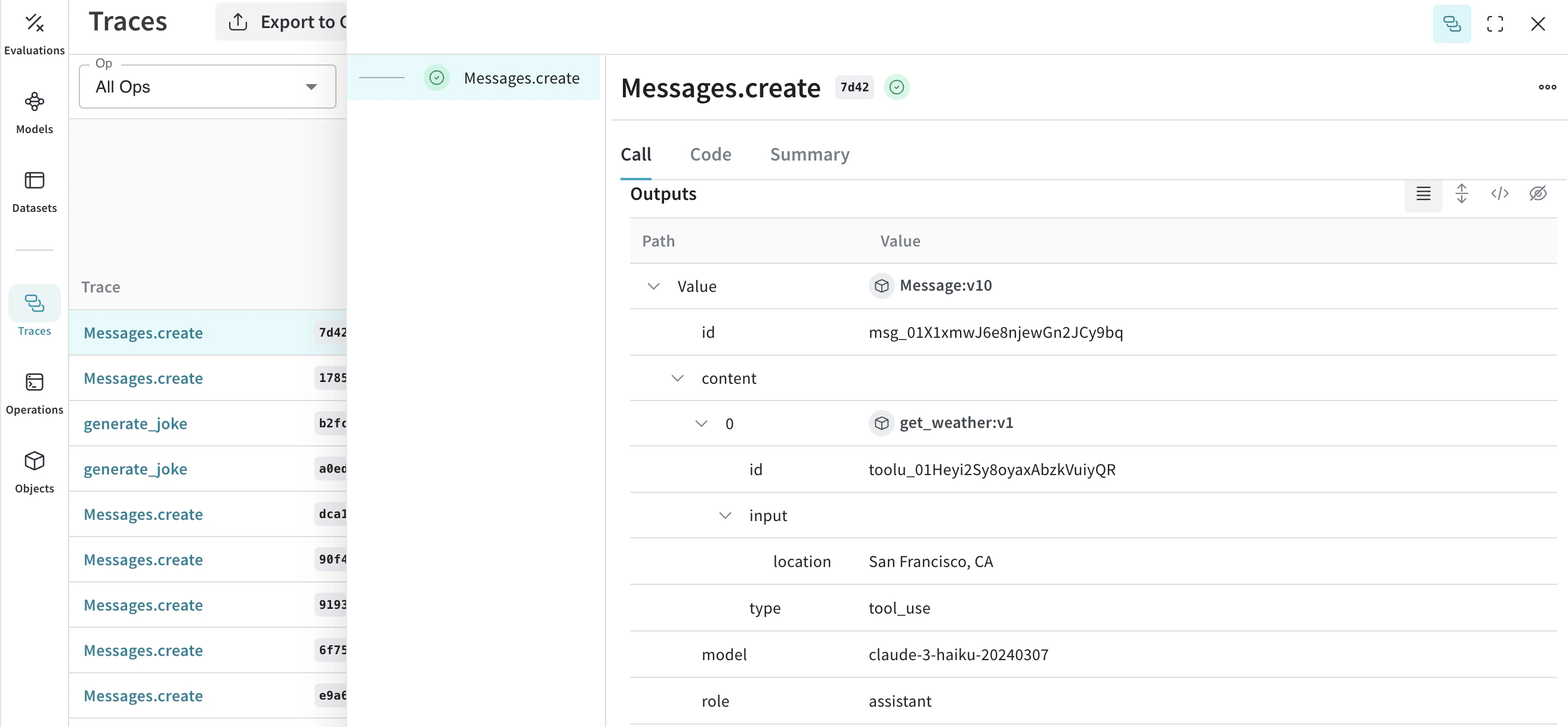
 Anthropic은 Claude가 함수 호출을 요청할 수 있도록 tools 인터페이스를 제공합니다. Weave는 대화 전반에서 도구 정의, 도구 사용 요청, 도구 결과를 자동으로 추적합니다.
다음의 축약된 예시는 Anthropic 도구 설정을 보여줍니다.
Anthropic은 Claude가 함수 호출을 요청할 수 있도록 tools 인터페이스를 제공합니다. Weave는 대화 전반에서 도구 정의, 도구 사용 요청, 도구 결과를 자동으로 추적합니다.
다음의 축약된 예시는 Anthropic 도구 설정을 보여줍니다.
message = client.messages.create(
    max_tokens=1024,
    messages=[
        {
            "role": "user",
            "content": "What's the weather like in San Francisco?",
        }
    ],
    tools=[
        {
            "name": "get_weather",
            "description": "Get the current weather in a given location",
            "input_schema": {
                "type": "object",
                "properties": {
                    "location": {
                        "type": "string",
                        "description": "The city and state, e.g. San Francisco, CA",
                    }
                },
                "required": ["location"],
            },
        },
    ],
    model=model,
)

print(message)
const message = await client.messages.create({
    max_tokens: 1024,
    messages: [
        {
            role: 'user',
            content: "What's the weather like in San Francisco?",
        }
    ],
    tools: [
        {
            name: 'get_weather',
            description: 'Get the current weather in a given location',
            input_schema: {
                type: 'object',
                properties: {
                    location: {
                        type: 'string',
                        description: 'The city and state, e.g. San Francisco, CA',
                    }
                },
                required: ['location'],
            },
        },
    ],
    model: 'claude-3-opus-20240229',
});

console.log(message);